MiPACS V5: The Dental Imaging Platform You Trust, Rebuilt for the Browser
MiPACS V5 is a web-based dental imaging solution built for faster deployment, centralized updates, DICOM workflows, AI support, and enterprise PACS needs.
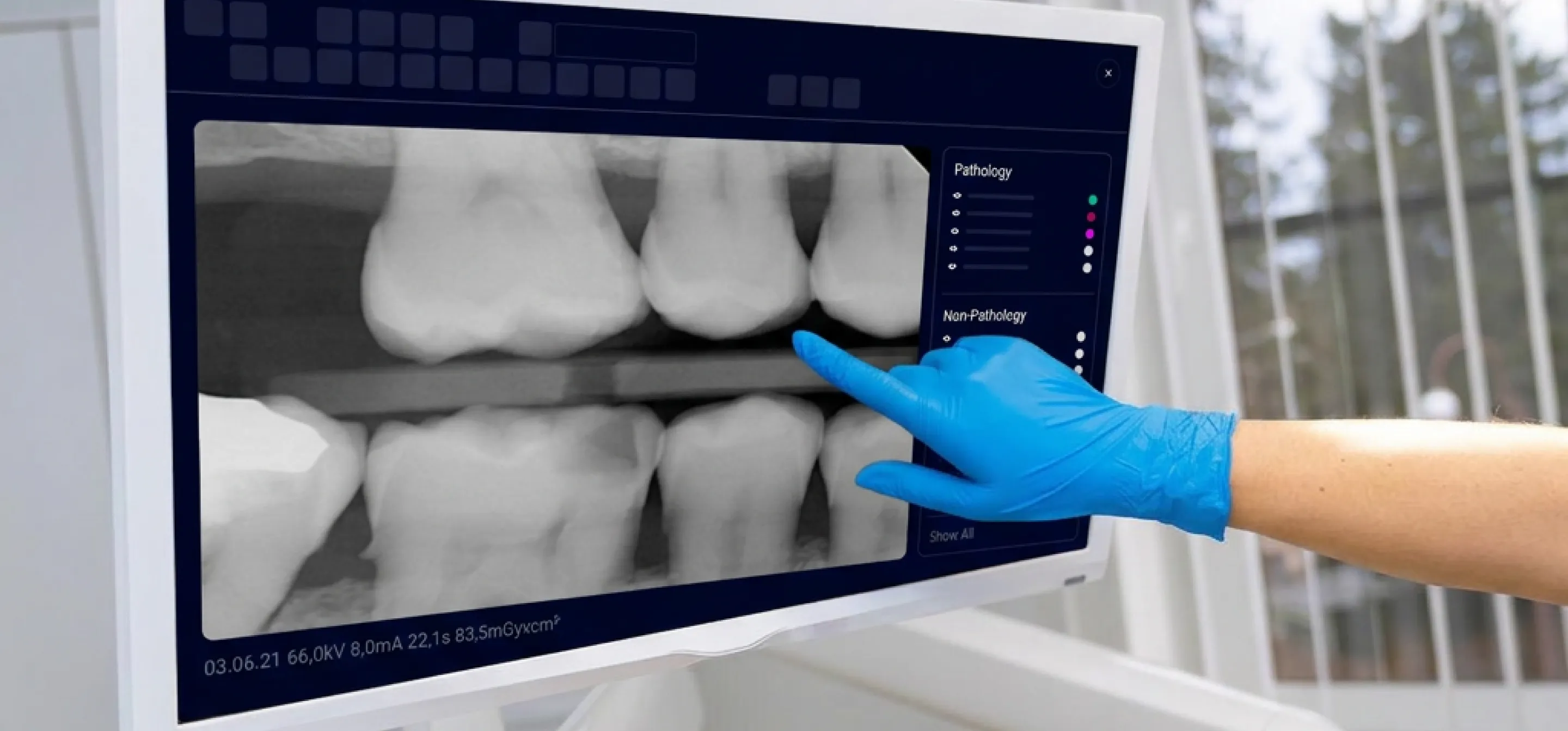
For more than two decades, MiPACS has helped dental organizations capture, store, view, and manage clinical images across complex environments. Private practices, DSOs, dental schools, FQHCs, specialty clinics, and government healthcare teams have used MiPACS to support dental imaging workflows that need to be reliable, secure, and easy to manage.
Now, MiPACS V5 brings that trusted experience to a modern web-based foundation.
MiPACS V5 replaces thick-client architecture with a fully web-based dental imaging platform. That means less workstation setup, fewer local software updates, simpler IT management, and a more consistent experience across locations. With capture included through a secure browser-based application, V5 is designed to help organizations reduce deployment time by more than 50% compared with V4 while preserving the workflows, integrations, and imaging standards customers already rely on.
This release is not a break from what made MiPACS valuable. It is the next step forward.
MiPACS V5 keeps the familiar imaging workflows organizations depend on and moves them into a modern, browser-based environment built for scale, performance, security, and long-term flexibility.
A Web-Based Dental Imaging Solution Built for Modern IT Teams
Every workstation installation takes time. Every local update adds another task for IT. Every site can become harder to manage when software versions, devices, and integrations are spread across multiple locations.
MiPACS V5 changes that.
With its fully web-based architecture, MiPACS V5 reduces the need to install and maintain client software on every workstation. Updates can be managed centrally, helping every site stay on a consistent version. For large dental groups, universities, and enterprise healthcare organizations, this can make a major difference.
Instead of repeating the same installation process across dozens, hundreds, or even thousands of workstations, IT teams can manage the dental imaging platform from a centralized environment. This helps reduce complexity, improve consistency, and support faster rollouts across the organization.
For clinical teams, the result is just as important. MiPACS V5 delivers a refreshed user interface and improved user experience while keeping the imaging workflows teams already know. The goal is simple: make the platform easier to access, easier to manage, and easier to use without forcing organizations to rebuild their entire imaging process.
What Is New in MiPACS V5?
MiPACS V5 introduces a modernized foundation along with new and improved tools for clinical, administrative, and IT workflows.
Fully Web-Based Platform
MiPACS V5 is built as a true web application. Users can access the platform through a secure browser, with image capture included. This helps reduce local software maintenance and gives organizations a more scalable way to manage imaging across workstations and locations.
Faster Deployment
V5 is designed to cut deployment time by more than 50% compared with MiPACS V4. For organizations with many operatories, multiple locations, or large training environments, this can save significant IT time.
Centralized Updates
Because V5 is web-based, updates can be managed centrally. This helps reduce version mismatches, limits workstation-by-workstation maintenance, and gives IT teams better control over the imaging environment.
UI and UX Refresh
The updated interface gives MiPACS a more modern look and feel while keeping the core workflows users already understand. The goal is to make daily imaging tasks easier without adding unnecessary complexity.
Modernized Infrastructure and Improved Performance
V5 is built on a modern technical foundation designed to support faster performance, easier management, and future growth. This gives organizations a dental imaging platform that can evolve with their needs.
Continuity for Existing MiPACS Customers
A major goal of MiPACS V5 is continuity.
Many dental organizations depend on MiPACS because it fits into the systems they already use. V5 is designed to preserve those important connections, including existing integrations with systems such as Epic, Dentrix, axiUm, and other practice management or electronic health record platforms.
That means customers can move forward without starting over.
MiPACS V5 also includes a Data Conversion Tool to support customers upgrading from MiPACS V4. This guided migration path helps organizations bring their existing imaging data into the new platform with less manual effort and a clearer upgrade process.
For teams that already rely on MiPACS, V5 offers a practical path to modernization. You get the benefits of a web-based dental imaging solution while keeping the core workflows, integrations, and imaging data that matter to your organization.
Built for DICOM Imaging Workflows
MiPACS has long supported standards-based imaging, and V5 continues that focus.
As a DICOM imaging platform, MiPACS V5 supports the needs of organizations that need consistent image storage, access, sharing, and management across devices and locations. V5 includes DICOM server support, multi-server DICOM query, and Local Gateway and Central Server support.
The platform also supports import and export of DICOM files and standard image file formats. This gives teams more flexibility when working with outside images, referrals, archives, and mixed imaging environments.
For enterprise PACS environments, DICOM support is not optional. It is a foundation. MiPACS V5 keeps that foundation in place while making the application easier to deploy and manage through the browser.
New Tools for Clinical and Enterprise Imaging Workflows
MiPACS V5 adds several features designed to make imaging more useful, more secure, and easier to manage.
Audit Logging
V5 includes audit logging tools that help organizations track and view HIPAA audit events. This supports stronger oversight and helps compliance teams understand who accessed patient imaging data, when access occurred, and what actions were taken.
Approval Workflow
The new approval workflow supports on-the-fly authentication, approval pop-ups, and user or group permissions. This is especially useful in dental education, enterprise review workflows, and any environment where image review and approval must be controlled.
Presentation and Copy Mode
Presentation and Copy Mode allows users to select images from multiple series and display them in a shared window. This can help with clinical review, teaching, case discussion, and patient communication.
Template Editor
The new Template Editor is a feature-complete replacement for the current MDEV template creator. It gives teams a modern way to manage imaging templates inside the V5 environment.
Contingency Mode
Network outages should not stop patient care. Contingency Mode supports local viewing and capture during a network outage, helping teams continue critical imaging workflows when connectivity is interrupted.
Image Calibration
V5 includes DPI settings per sensor to support calibration with measurement annotations. This helps teams use image measurement tools with better consistency across supported devices.
Advanced Filters
Advanced filter options, including DEJ, ENDO, and PERIO filters, help users evaluate images in ways that support specific clinical needs.
Preferences
User-definable preferences allow individuals to adjust settings to match how they work. This helps improve comfort and efficiency across different roles and workflows.
AI Support with Pearl Integration
MiPACS V5 includes Pearl AI Second Opinion overlay capability. This brings AI-supported image review into the MiPACS workflow, helping clinicians view AI findings without leaving the imaging platform.
For organizations that want to bring AI into their imaging process, the integration helps keep analysis connected to the clinical workflow instead of creating another separate tool for users to manage.
Flexible Login and Authentication Options
Different organizations have different security needs. MiPACS V5 supports multiple login methods, including application login, Windows authentication, OAuth, and LDAP.
This flexibility helps IT teams align access to existing identity management policies. It also supports the needs of enterprise, academic, government, and multi-site healthcare environments.
Device, PMS, and Controlled Capture Support
MiPACS V5 is designed to support the broad device and integration needs that customers expect from MiPACS.
Planned for general availability are device plugin support for existing I/O, panoramic, CBCT, and video devices, as well as PMS integrations for existing systems, including Epic, Dentrix, and others.
V5 also includes Modality Worklist support and controlled capture with automatic template support. This helps organizations improve accuracy, reduce manual steps, and keep imaging tied to the right patient and procedure.
Why MiPACS V5 Matters
MiPACS V5 matters because it solves a common problem in dental imaging: how to modernize without disrupting the organization.
Many dental teams want the simplicity of a browser-based application, but they cannot afford to lose device support, DICOM workflows, PMS integrations, approval controls, audit trails, or existing imaging data.
V5 is built to bring those needs together.
It gives IT teams a more manageable platform. It gives clinical users a modern interface. It gives leadership a stronger foundation for scale. It gives existing customers a guided path from V4 to V5.
Most importantly, it helps organizations spend less time managing imaging software and more time using imaging to support patient care.
Who Should Upgrade to MiPACS V5?
MiPACS V5 is a strong fit for organizations that want to reduce workstation maintenance, simplify imaging deployment, and move toward a browser-based dental imaging solution.
It is especially useful for:
- Dental service organizations managing many locations
- Dental schools that need role-based workflows and approval tools
- FQHCs that need secure, scalable imaging across sites
- Government and VA healthcare environments with strict compliance needs
- Specialty and imaging clinics using multiple modalities
- Private practices that want a modern dental imaging platform without replacing their existing workflows
- Customers with active maintenance agreements are eligible to upgrade to MiPACS V5
Frequently Asked Questions About MiPACS V5
What is MiPACS V5?
MiPACS V5 is the newest version of the MiPACS dental imaging platform. It is a fully web-based application designed to support image capture, viewing, management, DICOM workflows, integrations, audit logging, approvals, and enterprise imaging needs.
Is MiPACS V5 web-based?
Yes. MiPACS V5 is built as a true web-based platform. Users can access the application through a secure browser, which helps reduce the need for local workstation installations and manual updates.
How does MiPACS V5 help IT teams?
MiPACS V5 helps IT teams by reducing workstation setup, supporting centralized updates, improving version consistency, and simplifying deployment across locations. Deployment time is reduced by more than 50% compared with V4.
Can existing MiPACS V4 customers upgrade to V5?
Yes. Customers with active maintenance agreements are eligible to upgrade to MiPACS V5. A Data Conversion Tool is included to support guided migration from MiPACS V4 to V5.
Does MiPACS V5 support existing integrations?
MiPACS V5 is designed to preserve key workflow integrations, including integrations with systems such as Epic, Dentrix, axiUm, and others.
Does MiPACS V5 support DICOM imaging?
Yes. MiPACS V5 supports DICOM imaging workflows, including DICOM server support, multi-server DICOM query, and import and export of DICOM and standard image file formats.
Does MiPACS V5 support AI?
Yes. MiPACS V5 includes Pearl AI Second Opinion overlay capability, helping clinicians view AI-supported findings inside the MiPACS workflow.
Get Started with MiPACS V5
MiPACS V5 brings trusted dental imaging workflows into a modern web-based platform. It is built for faster deployment, simpler updates, secure access, DICOM imaging, enterprise PACS workflows, and the integrations customers already depend on.
Customers with active maintenance agreements are eligible to upgrade.
Contact your MiPACS account team to plan your migration to V5, review your current environment, and prepare your organization for a smoother move to the new web-based platform.
Book a V5 demo now to see it in action!
Read Similar Articles

.webp)

