.webp)
MiPACS Dental Imaging Solution
An enterprise dental PACS built for secure image capture, storage, viewing, and access across every location. MiPACS is a dental imaging solution that works with 200+ imaging devices, integrates with leading EHR and PMS, and scales from single practices to enterprise networks.
.webp)
A Dental PACS That Works with Your Environment
You've already invested in your imaging devices, EHR, workflows, and infrastructure. MiPACS fits into that environment without vendor lock-in, proprietary formats, or rip-and-replace decisions.
With MiPACS, dental organizations can capture, store, manage, and access images through secure, standards-based workflows built for clinical teams, IT administrators, and multi-site operations.
The Complete Dental Imaging Solution
Capture, view, manage, access and store dental images across your organization.

Explore the dental imaging platform
Device-Agnostic Image Capture
Capture images from any device in one application. MiPACS is DICOM 3.0, DICOMweb and HIPAA-compliant.
Integration with clinical management systems allows your EHR to serve as a single source of truth. Image manipulation and analysis tools support diagnosis. Import or export virtually any common image format. Granular security controls and audit logging ensures only appropriate users can capture, approve, delete, edit, print, export, and import.
Capture images from any device. DICOM and HIPAA-compliant with integration, image tools, and advanced security controls.

Modern Image Viewing
Securely access, review, compare, annotate, manipulate, and present images from a single workspace.
MiPACS includes a zero-footprint, browser-based viewer which provides a rich, experience with familiar tools, measurements, annotations, and full DICOM tag viewing. It enables secure access to images and user restrictions, ideal for imaging centers sharing images with referring doctors.
Zero-footprint web viewer. Securely access and share images with full DICOM viewing and familiar tools.
.png)
Centralized Storage & Management
Store images in a secure, centralized dental PACS that scales with your needs, from single site to multi-petabyte deployments.
- DICOM Router+ for automated workflows
- HL7 interface for patient updates
- Modality Worklist for DICOM worklist services
- Centralized visibility through a dashboard
The foundation under your imaging
.png)
Powering every capture, every site
Open standards
200+ supported devices from 50+ manufacturers. Mix Dexis sensors with Planmeca panoramic x-rays and Carestream CBCT. Use what works for each location. Acquired a practice with different equipment? It already works with MiPACS.
Full DICOM compliance
100% DICOM 3.0 and DICOMweb compliance. Images stored in DICOM format. You own your images. It works with any standards-compliant system. Period.
True centralization
One database for your entire organization. Not shared storage—actual centralization. Images captured anywhere, accessible everywhere. One backup. One system to manage.
Built to grow with you
From 10 to 10,000+ locations. Network load balancing, high availability, and architecture that scales without replacement.
.webp)
Integrate your entire environment
Imaging Devices:
MiPACS supports 200+ imaging devices from 50+ manufacturers, including supported intraoral sensors, panoramic and cephalometric units, CBCT systems, phosphor plate scanners, digital cameras, and video sources.
Supported manufacturers include Carestream, Dexis, Schick, Planmeca, Sirona, and more.
EHR and PMS:
MiPACS integrates with leading EHR and practice management systems (PMS), including Epic, Cerner, Titanium Solutions, axiUm, Dentrix, eClinicalWorks, OpenDental, NextGen, and more.
Launch imaging workflows from your clinical system with patient context, single sign-on, and automatic demographics support.
Infrastructure:
MiPACS is web-based and deployed in your environment, giving your organization control over infrastructure, security, and image data. The zero-footprint browser client reduces maintenance and provides consistent access across locations.
MiPACS works with enterprise infrastructure such as Microsoft SQL Server, Active Directory, LDAP, OAuth, and approved authentication workflows.
Deploy your way
One platform with multiple deployment paths
Start simple. Scale to centralized or distributed. No re-architecture required. From one location to thousands. On-prem, cloud, or hybrid, match your infrastructure and configure it your way.
.png)
Single Site
One server, one location. Simple and proven.
.png)
Multi-Site Central
Remote locations connect to central server. Centralized management with distributed access.
.png)
Multi-Site with Mini-PACS
Local servers with automatic sync. Fast local performance + built-in high availability. Resilient to outages.
.png)
Cloud or Hybrid
Your choice. Your infrastructure. Your security requirements.
.png)
Explore specialized solutions
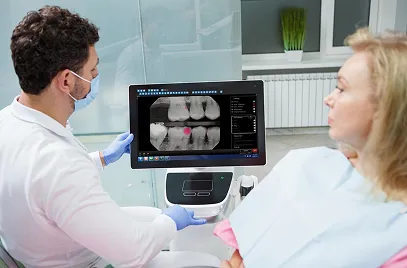
MiPACS + Pearl AI
Catch more in every image with real-time AI. FDA-cleared Second Opinion® detects caries, calculus, periapical radiolucency, and restorations automatically as images are captured.
MiPACS University Edition
Built for dental education. Role-based access, approval workflows, and multi-site support for students, faculty, and clinics.

MiPACS FQHC Edition
Designed for community health. Epic Community Connect integration, multi-site scalability, and enterprise capabilities within FQHC budgets.





MiPACS Dental Imaging Solution FAQs
Find answers to common questions aboutMiPACS, an enterprise dental PACS platform for secure image capture, storage,viewing, and management.
What is the MiPACS Dental Imaging Platform?
MiPACS is an enterprise dental PACS for capturing, viewing, storing, and managing dental images. It supports browser-based workflows, DICOM and DICOMweb image management, broad device compatibility, centralized storage, and secure access controls.
Does MiPACS work with existing imaging devices?
Yes. MiPACS supports 200+ imaging devices from 50+ manufacturers. If a device is not listed, the MiPACS team can help verify compatibility for your environment.
Do we have to replace our current EHR, PMS, or imaging hardware?
No. MiPACS is designed to work with existing clinical and IT systems. It can integrate with EHR and PMS platforms and support a wide range of imaging devices.
Is MiPACS DICOM compliant?
Yes. MiPACS supports DICOM 3.0 and DICOMweb-compliant image management. This helps organizations manage imaging data using standards-based workflows.
How does MiPACS support secure and HIPAA-compliant workflows?
MiPACS supports HIPAA-compliant workflows with audit logging, user restrictions, secure authentication, and role-based access controls. Administrators can manage image access and actions by user or group.
Can MiPACS scale across multiple locations?
Yes. MiPACS supports single-site practices, multi-site organizations, universities, FQHCs, government programs, and enterprise dental networks.
What deployment options does MiPACS support?
MiPACS is web-based and deployed in the customer environment. It supports single-site, centralized multi-site, and distributed enterprise imaging workflows, with browser-based access and centralized updates.
What viewing, capture, and storage capabilities are included in MiPACS?
MiPACS supports browser-based image capture, viewing, annotation, manipulation, storage, and management. It also supports secure access, audit logging, DICOM workflows, and configured options such as modality worklist, HL7 integration, and routing.
Does MiPACS include support and implementation help?
Yes. MiPACS provides implementation and support services that can include network assessment, server installation, workstation setup, device testing, system integration, workflow customization, staff training, and ongoing technical support.
How do we know whether MiPACS is right for our environment?
The best next step is to schedule a demo or technical consultation. MiPACS can review your devices, systems, infrastructure, security needs, and deployment goals, then show how the platform can fit your environment.
.webp)

